Fortres 101 Version 6.0

Complete desktop security eliminates computer mischief. Restrict unwanted computer use with this easy, time saving, powerful software.

New! Fortres 101 6.0

Clean Slate 5.0 is Vastly SuperiorClean Slate is Better - View a Comparison of Technologically Superior Clean Slate to Reboot to Restore Products

Fortres 101 6.0

Why Upgrade

Screen Shots

Video Tutorial

Download Demo

System Requirements

Pricing

Sales: 800-331-0372

Commercial

Educational

International Resellers

Testimonials & Awards

At a glance

Fortres 101

Fortres 101
Proven Desktop Security Software

Attention Sign“With Fortres 101 printer configurations aren’t changed, important files aren’t deleted, and no more vulgar wallpaper! This has saved my sanity.”

The superior desktop security of Fortres 101 can easily lock down your Windows computers. Fortres 101 is the solution to malicious or accidental destruction of computers, problems with inconsistent interface, and inconsistent printing behavior. Fortres 101 has successfully secured computers for years and is voted the best desktop security software for Windows.

Prevents Unwanted Downloads

Fortres 101 is an innovative security agent that resides invisibly between the computer and the user. Every computer action is quietly monitored to determine if that action is permitted or not. As a systems administrator for one or one thousand computers, software security is a must.

Saves Time and Money

Protecting not only the software and hardware applications, Fortres 101 also protects time and money by preventing damage to files and programs. You will no longer waste time re-imaging, ghosting, or reinstalling software because of accidental or mischievous deletions and errors.

Provides Complete Control

Attention SignTip: Did you know that Fortres 101 is easier and more robust than Windows security?

Fortres 101 provides complete control over every aspect of Windows operations. Prevent users from interrupting the boot process; exiting Windows; accessing a command prompt; adding, moving, or deleting icons; altering anything about the appearance of Windows; installing, copying, or downloading software; running any programs not specified by the administrator; using low-level system tools; changing printer configurations; changing screen saver configurations; accessing unauthorized Web sites; erasing important system files; saving files on the hard disk; and even accessing files on the hard disk.

Security Averse and Finicky Programs Always Work

The effortless configuration Fortres 101 offers is ideal. Fortres 101 can automatically configure many applications that require special attention, easing administration. A number of applications, typically legacy antivirus types, do not treat the file system in a way that is compatible with the default configuration of Fortres 101. Fortres 101 will look for these known applications and make special accommodation so the applications can function as designed while Fortres 101 security is active. Nothing is required of you but to install Fortres 101.

Protection from Rogue Administrators

Fortres 101 protects from rogue administrators. All of the security features can be applied to local system administrators and domain administrators, too. Normally, administrators have unrestricted access to a computer. Fortres 101 changes this, and allows enforceable restrictions on administrators’ activities.

Policy Restrictions

Policy Restrictions provides a way to quickly implement group policy restrictions that may not have explicit counterparts in Fortres 101, without the baggage, learning curve, and undiagnosable failures attendant to the group policy editor. This feature does not actually use the group policies and does not write the values to the registry. If the group policy editor is being used in addition to Fortres 101, the settings here will take precedence over settings made in the group policy editor.

Provide Protection by Blocking Local and Removable Drives

Fortres 101 offers you the ability to restrict/block local hard drives and removable media drives as well as any local file, folder, or application.

Easy to Use

Attention SignDid you know that Fortres 101 not only saves your computer tech's time but also support costs?

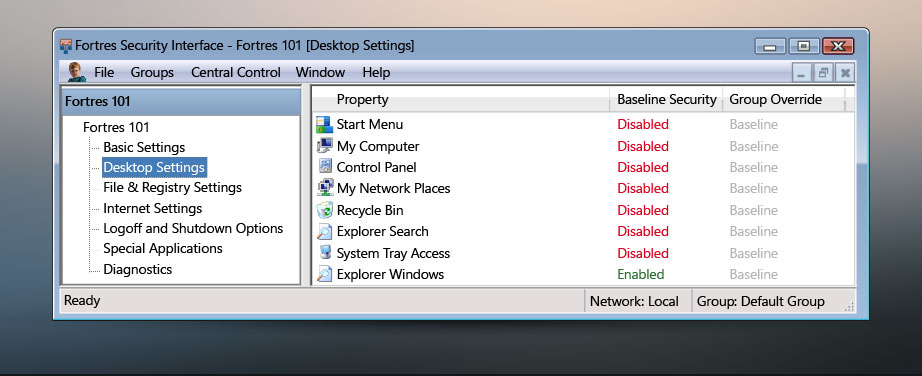
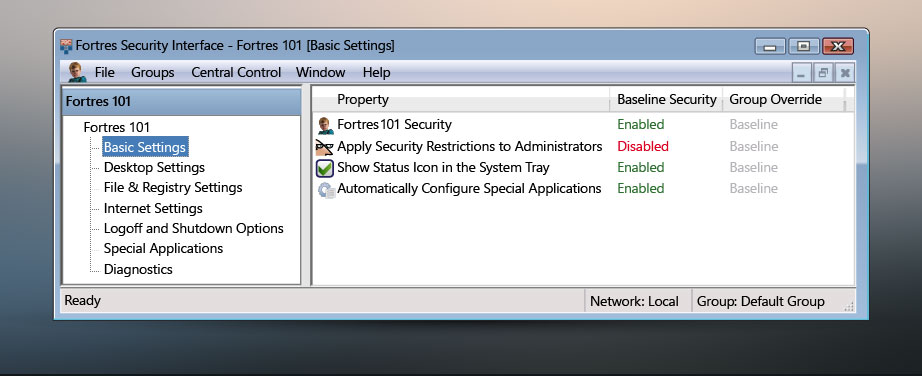
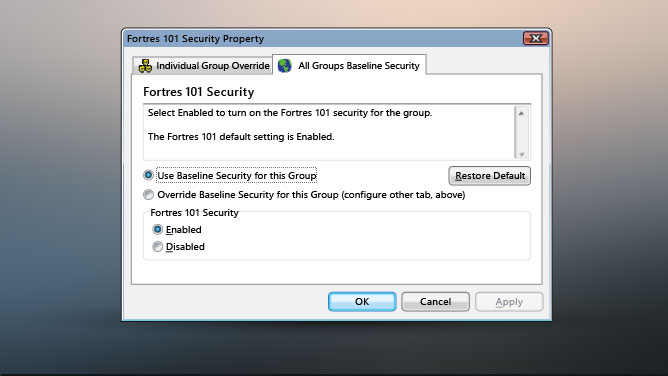
Fortres 101 offers flexibility and ease of use. Each security option includes a description explaining how to secure your computer. Once the security option is set, a color coded Enabled or Disabled option allows for easy viewing of security. If an option is unsecured, the security indication word, Enabled, is bright green to grab your attention. You will never accidentally leave an area unsecured again.

Provides Quick Customization

You will be relieved by the time saving feature, Global Settings. By simply clicking on the tab labeled Global, the security feature is applied to all the groups.

Upgrading is Easy

Upgrading Fortres 101 is quick and easy, especially when you use Central Control to upgrade the computers remotely. Configuring the upgrade is a breeze. The Conversion Wizard adjusts the security settings to match what you already secured with the previous version. Plus, by keeping your license current, you are assured of discounted prices for future upgrades!

Central Control:
Powerful Network Add-on Saves Time

Central Control allows an administrator to configure all of the Fortres 101 and Clean Slate installations from one location. For more information on Central Control, click here.

Enhance Fortres 101 security with Central Control network software.


To learn more about Central Control, click here.

Please Note: Fortres 101 is designed to be installed on desktop operating systems. We do not recommend installing Fortres 101 on a Windows NT Server, Windows NT Terminal Server, or Windows 2000 Server computer. As such, we do not provide technical support for Fortres 101 when it is installed on these network operating systems.
Copyright © 2008-2009 Fortres Grand Corporation. All trademarks owned by their respective companies. Best desktop security software ratings include restrictive and nonrestrictive security software.