fortres 101 (On-prem, No Cloud)
Version 12
Restrictive desktop protection & lockdown security for all Windows platforms; includes secure remote computer grouping, monitoring, and management, even for non-domain computers
Desktop Security
& File Lockdown Software
In minutes, effortlessly
restrict access to any
aspect
of Windows operation
& Win Today!
Fortres 101 locks down the desktop.
Block user access to files, folders, programs, drives, etc.
while preventing users from:
- Exiting Windows
- Accessing a command prompt
- Adding, moving, or deleting icons
- Altering anything about the appearance of Windows
- Installing, copying, or downloading software
- Running any programs not specified by the administrator
- Using low-level system tools
- Changing printer configurations
- Changing screen saver configurations
- Accessing unauthorized Web sites
- Erasing important system files
- Saving files on the hard disk and even accessing files on the hard disk
What Fortres 101 Actually Does
It takes full control of security for every Windows 10/11 computer in your lab and keeps it in a clean, consistent, and secure state — no matter what users do. Here’s exactly how it protects and simplifies your lab:
- Locks down the entire desktop — Users cannot add, move, delete, or rename icons. They cannot change wallpapers, themes, screen savers, or any Windows appearance settings. Every student or patron sees the exact same clean desktop every single time they log in.
- Blocks unauthorized programs and changes — Only the applications you approve can run. Users cannot install software, download programs, or run anything you haven’t explicitly allowed. This instantly stops malware, viruses, ransomware, and “I just wanted to try this game” installs.
- Protects files, folders, and drives — It can completely hide or block access to local hard drives, USB drives, and specific folders. Students cannot save files to the C: drive, delete important system files, or accidentally (or intentionally) destroy data.
- Prevents system tampering — Command Prompt, Registry Editor, Control Panel, Task Manager, and other powerful tools are restricted or completely disabled. Even local administrators can be locked out of making changes.
- Central cloud management — Manage your entire lab (or multiple labs) from any web browser, anywhere in the world. Group computers, push policy changes instantly, monitor status, and even manage non-domain-joined machines — no need for Active Directory or complicated Group Policy.
Why Lab Managers and IT Directors Love It (and Buy It)
- Drastically reduces your workload Instead of spending hours every week re-imaging machines, fixing broken desktops, removing viruses, or restoring deleted files, you simply install Fortres 101 once. Many labs report cutting support time by 80–90%.
- Saves serious money Fewer re-images = less staff time + less downtime. One university library with 60+ machines reported dramatically reduced repair time after switching to Fortres and strongly recommends it for any public workstation environment.
- Creates a consistent, professional experience Every user gets the same reliable desktop and working environment. No more “my computer looks different” complaints or broken print settings.
- Stops both malicious and accidental damage It protects against vandals trying to hack the system and well-meaning students who accidentally delete files or change settings.
- Easy to deploy and manage Install it, configure your policies through the clean web interface, and you’re done. Updates and changes can be pushed remotely without touching each machine.
Bottom Line for Your Computer Lab
Fortres 101 turns your lab computers from high-maintenance liabilities into reliable, low-maintenance assets. You get rock-solid security, consistent user experience, and dramatically lower support costs — all with minimal ongoing effort.
If you manage a computer lab and are tired of constantly fixing machines, Fortres 101 is one of the highest-ROI purchases you can make. It pays for itself very quickly through reduced IT time and happier users.
Ready to protect your lab? Request a personalized quote directly from Fortres Grand — they’ll help you get the right licensing for your number of machines and show you exactly how it will work in your environment.
Your lab (and your sanity) will thank you. !
Desktop Security
& File Lockdown Software
The desktop and file lockdown security of Fortres 101 Cloud restricts access to any aspect of Windows operation. Affordable, effortless, powerful.

Eliminate Virus Downloads
Fortres 101 Cloud restricts downloads and software installations, including viruses & malware
Protection by Blocking Local & Removable Drives
Fortres 101 Cloud offers you the ability to restrict/block local hard drives and removable media drives as well as any local file, folder, or application.
Easy Remote Administration
Fortres 101 Cloud allows complete administration from any device anywhere with secure web-based configuration. You can even group, organize, and assign tasks to non-domain computers.
In 30 Seconds: How to Free Your Life of
Computer Mischief
Our university library has utilized Fortres as its primary security tool for 4 years and the results have been excellent in terms of "hackability" for 60 plus machines. The time spent repairing compromised workstations has been dramatically reduced. I can recommend Fortres without qualification for public workstations
Our Customers Succeed
with Fortres 101!
See All Reviews
I only wish I knew of Fortres when I was configuring systems for children & other careless users, it's practically bulletproof!Voorhees, NJ
Unfortunately, Fortres 101 is, in general, a rather secure program. There aren't really any holes in the program that have been discovered.Found on a hacker web site
Fortres has really helped me reduce my work. As a system administrator, I have saved a lot of time doing other important things than maintaining the PCs, all thanks to Fortres.Singapore
Comprehensive Security from
Malicious or Inexperienced Users Fortres 101 has successfully secured computers for years
and is voted the best desktop security software for Windows.
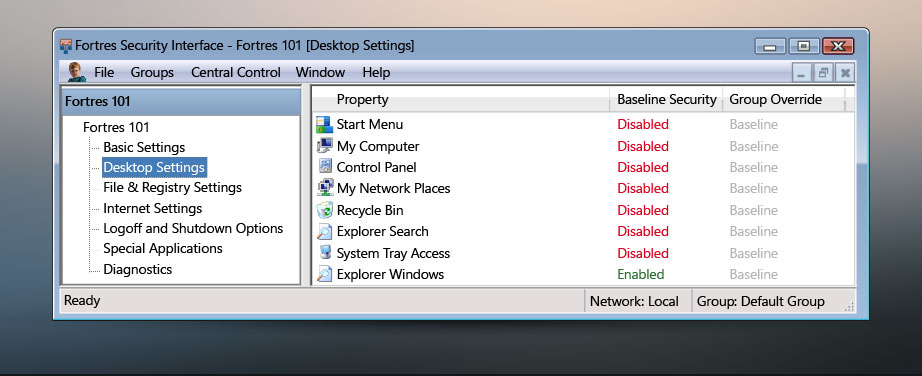
Desktop Settings
Configure how users interact with the desktop; allow/block printing, access to the Breadcrumb Bar, Navigation Buttons, Side Bar & Gadgets
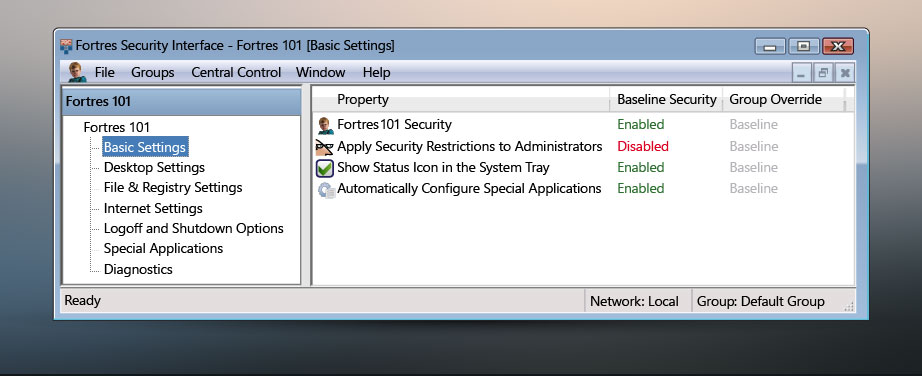
Basic Settings
Quickly disable and enable security for an Administrator login, computer, user, and group with the Basic Settings window
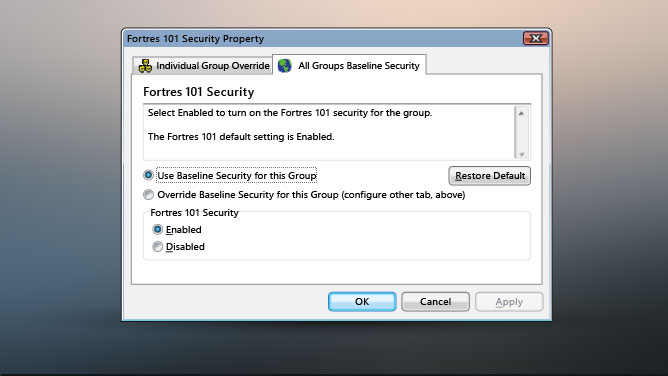
Enabled/Disabled Window
Using the Enabled/Disabled property window, configure Fortres 101 security by simply selecting Enabled or Disabled
Conquer
Human Threats & Malware
Easily Secure Windows 11/10
with the desktop lockdown security of Fortres 101